Do players need an account or an app?
No. Players open getpickads.com/play in their phone browser, enter a name and choose a smiley face.

Updated November 2026
Trivia Host is a free live trivia maker by Pick Ads. Pick a template or write your own quiz, show a QR code, and everyone plays from their phone. Pro and Business add bigger rooms, unlimited quizzes and all room styles.
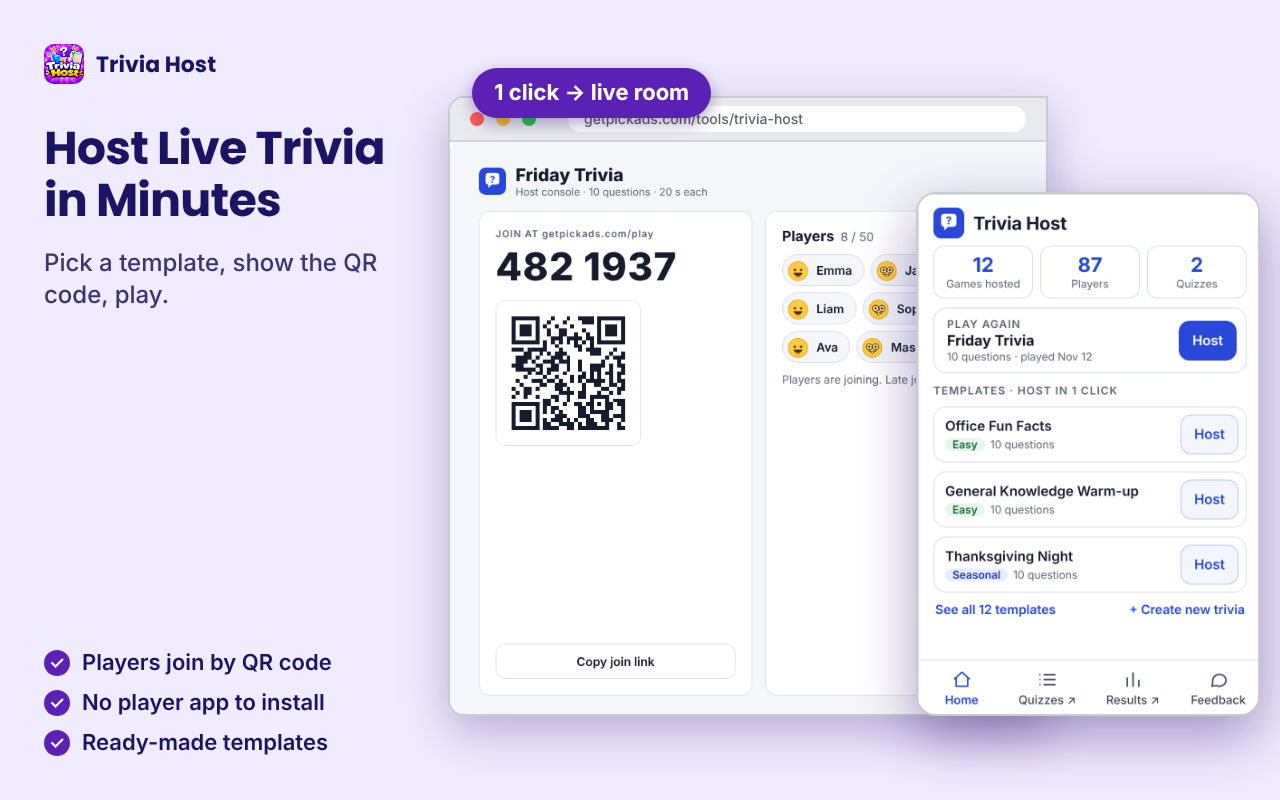
Host a live trivia game without slides, buzzers or apps. Trivia Host gives you a host console, a big-screen display and a join page for players. Choose a ready-made quiz, start a room, and run the game while your group answers on their phones.
Free covers small groups. Pro is for larger rooms (50). Business hosts up to 100 players.
Free: up to 5 players. Pro: $9.99 / month (50 players). Business: $19.99 / month (100 players).
 1 / 5
Trivia Host is a web app for running live multiple-choice trivia. You open a room, players join at getpickads.com/play with a QR code or a 7-digit room code, and you control the game from the host console. A second tab shows the question, the correct answer and the leaderboard on a projector or TV.
Players do not need an account or an app. They enter a name, choose a smiley face and play. The correct answer reaches players only after you reveal it, so nobody can peek.
Sign in with your Pick Ads account to save quizzes and see results. The same account is used by the optional Chrome shortcut.
Pick a template on the Dashboard and press Host. The room opens in a new tab with a room code and QR.
English quizzes for office, classroom, family and seasonal nights. Host one as it is, or press Clone to edit your own copy.
Give your trivia a name, set the time per question and add multiple-choice questions. Or paste questions from Docs, Sheets or an AI chat.
Players use any phone browser. Players who lose connection can rejoin the game in progress.
A separate display page for projectors and TVs: question, countdown, correct answer, leaderboard and final podium.
Scores update after every question. You see who has answered before you reveal the answer.
Choose how the game looks on phones and on the big screen. Free includes Neon Pop and High Contrast. Pro and Business include all 6 styles.
See past games and the percentage of players who got each question right.
$0
Pro for mid-size rooms. Business for large events.
Pro $9.99 / month · Business $19.99 / month
Start an all-hands or a virtual Friday with a 10-question icebreaker. Players join from any device.
Review a lesson or close a workshop with a quick quiz. No student accounts needed.
Show the questions on the TV, let guests scan the QR code, and run a leaderboard without paper.
Host a holiday quiz from the sofa. Templates are ready, so setup takes a minute.
Players cannot join after the game starts. Players already in can rejoin if their connection drops. Keep the host tab open while the game runs.
No. Players open getpickads.com/play in their phone browser, enter a name and choose a smiley face.
No. Everything runs on the web. The Chrome extension is an optional shortcut that opens your quizzes and starts games faster.
Free rooms hold up to 5 players. Pro rooms hold up to 50. Business rooms hold up to 100.
Yes. Create a quiz from scratch, or paste questions from Docs, Sheets or an AI chat. You can also clone any template and edit your copy.
No. The correct answer is sent to phones and the big screen only after you reveal it.
No. Once you start, the room is closed to new players. People already in the game can rejoin by themselves if they lose connection.
Multiple choice today. Other types such as typed answers are planned.
No. Trivia Host is an independent product by Pick Ads. Template content is original.
Start with the manual steps. The extension is the faster path when the list is long.
Find GTA 6 trivia questions with clear answers on Jason, Lucia, Vice City and GTA history. Use them for solo practice or a hosted game night.
Play a GTA 6 true or false quiz about Lucia, Jason, Leonida and Vice City. Practice alone or host a fast live round with friends on Trivia Host.
Take a Grand Theft Auto trivia quiz covering classic Vice City, GTA V and GTA VI. Play solo or host a live franchise challenge with friends.
Try a GTA 5 vs GTA 6 quiz on characters, cities and story settings. Test yourself solo, then host a live comparison challenge with friends.
Play a Vice City quiz covering classic GTA lore and the return to Leonida. Practice solo or challenge friends to a live trivia game with a QR code.
Take a GTA 6 characters quiz on Jason, Lucia and their world. Practice solo, review the answers, then host a friendly live character trivia round.
Explore GTA 6 trivia about Lucia, Jason, Vice City and Leonida. Try a solo challenge or turn these questions into a live game night with friends.
Take a free GTA 6 quiz on Vice City, Lucia, Jason and Leonida. Play solo first, then challenge friends in a live Trivia Host room with a QR code.
Run a virtual team quiz on Google Meet or another video call. Use slides for a free option or Trivia Host for phone answers and a leaderboard.
Plan a trivia game for 50 people with a clear join process, host screen, fair timing, and leaderboard. See how Trivia Host Pro fits the room size.
Add a live quiz to a meeting or presentation using slides or Trivia Host. Learn when to show a QR code, how to pace questions, and reveal scores.
Create a live QR-code quiz for phones using a free manual setup or Trivia Host. Share a room code, show questions, and display live scores.
Plan a Thanksgiving or family trivia night with easy question themes, a simple schedule, and optional QR-code phone play using Trivia Host.
Learn fair trivia scoring rules, tiebreakers, and leaderboard tips. Compare manual score sheets with Trivia Host's live scoring and results.
Turn questions in Google Docs or Sheets into a live multiple-choice quiz. Learn the manual method and how to paste questions into Trivia Host.
Learn how to host a pub trivia night with paper scorecards or Trivia Host. Plan rounds, put questions on a TV, and let guests join by QR code.
Run a classroom quiz using phones with Google Forms or Trivia Host. Learn how to create questions, show a QR code, and review live results.
Try 15 trivia ideas for team meetings and virtual icebreakers. Run a quick round with free tools or use Trivia Host for QR joining and live scores.
Learn how to host a trivia night online with free tools or Trivia Host. Prepare questions, invite players by QR code, and reveal live scores.
Practical setups by niche. Browse the full list or jump into a vertical.
Play GTA 6 trivia with friends using a room code and QR join. Start with a solo warm-up, then host character, Vice City and GTA history rounds.
Host multiplayer trivia for a Discord call, Twitch community or living-room game night. Share a QR code and run live GTA-themed rounds in Trivia Host.
Compare simple icebreaker games for remote teams, from chat prompts to live trivia. Learn when Trivia Host can add QR joining and a leaderboard.
Organize a birthday party trivia game using paper questions or Trivia Host. Get simple question ideas, a TV setup, and QR-code joining tips.
Use a live quiz to reinforce learning at employee workshops. Compare a paper knowledge check with Trivia Host's phone answers and results.
Plan a 15-minute team-building trivia activity for work. Start with a free slide quiz or use Trivia Host for QR-code joining and live scores.
How Trivia Host stacks up against alternatives and build-vs-buy options.
Compare Trivia Host with Quizizz, now Wayground, for live and assigned quizzes. See which fits classroom practice, training, or event trivia.
Compare Trivia Host and Mentimeter for live quizzes and workshops. Explore question types, audience interaction, QR joining, and leaderboard use.
Compare Trivia Host and Google Forms for multiple-choice quizzes. Choose a live leaderboard game or a self-paced quiz with answer keys and feedback.
Compare Trivia Host vs Kahoot for live quizzes, QR joining, templates, and room size. Find a practical fit for meetings, classes, or parties.
Players only enter a display name. They do not need an email address or an account. Game state such as scores and answers is kept on our servers during the game so the host, the big screen and the phones stay in sync. See the privacy policy for what is stored after the game and for account, billing and analytics details.
Pick a template, show the QR code and let your group play.
Guides · Use cases · All Extensions · Contact · Terms
Explore other Pick Ads extensions, or browse the full extensions directory.
Discover how marketing teams and brands turn product URLs into high-converting ads with Pick Ads commercial use cases.