Is MapLeadFinder free?
Yes. Free users can extract up to 10 business leads per scrape with no payment required. Premium removes the limit and adds email finder and social media discovery.

Updated November 2026 · v1.0.0
MapLeadFinder is a free Chrome extension by Pick Ads that helps you find local business leads and extract contact information from Bing Maps search results, with a Premium plan for email enrichment and social media discovery.
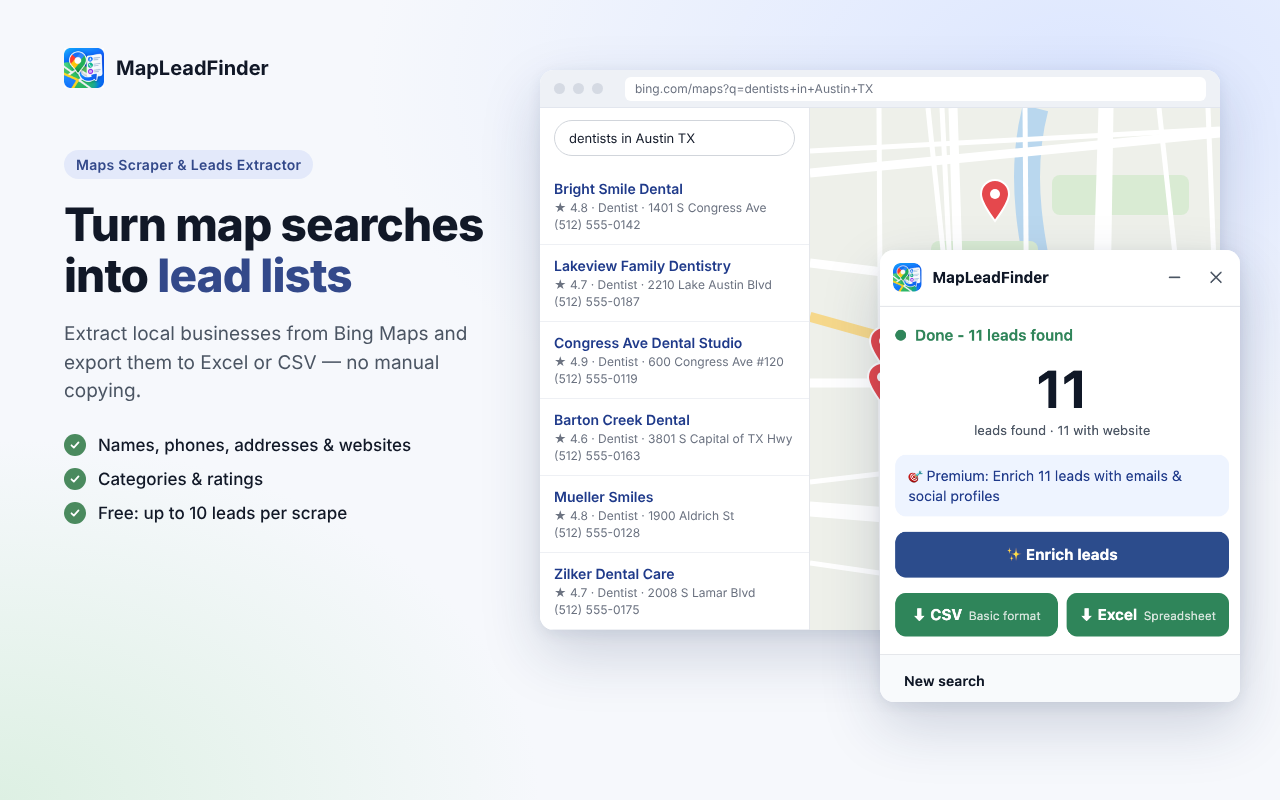
Search by business category, keyword or location to discover potential customers. Automatically collect business names, phone numbers, addresses, websites, categories, and ratings. Export your results to Excel or CSV spreadsheets.
Use it for sales prospecting, local business research, agency lead generation, and building targeted B2B contact lists. Stop copying business information one by one.
Free: 10 leads per scrape. Premium is $9.99 / month or $99.90 / year.
 1 / 5
MapLeadFinder is a maps scraper and lead generation tool that helps sales professionals, marketers, agencies and business owners discover local businesses and build organized prospect lists.
Search for businesses by keyword, industry or location, automatically collect available business details and export your results to a spreadsheet. Free users can extract up to 10 business leads per scrape.
Search by business category, keyword or location on Bing Maps. Discover potential customers directly from map search results.
Automatically collect business names, phone numbers, addresses, website URLs, business categories, and ratings from Bing Maps.
Visit publicly accessible business websites to discover available email addresses and additional contact information.
Find publicly available social media profile links from business websites to enrich your prospect lists.
Export collected business data into clean, structured spreadsheets for sales research, lead management, or importing into CRM tools.
Extract up to 10 business leads per scrape without payment. No credit card required for the free plan.
$0
$9.99 / month or $99.90 / year
Find local businesses, collect contact details and build targeted B2B prospect lists for sales outreach.
Research businesses across industries and locations, extract available contact information and prepare organized lead databases.
Discover potential clients who may need SEO, advertising, website development, social media management or other marketing services.
Find businesses that match your target industry or location and organize potential customers for prospecting.
Explore nearby businesses, research potential partners and discover local business opportunities.
Collect structured information about businesses, categories, locations and ratings for local market analysis.
Free users can extract up to 10 leads per scrape. Premium users can extract more leads in a single run and enrich available contacts.
Yes. Free users can extract up to 10 business leads per scrape with no payment required. Premium removes the limit and adds email finder and social media discovery.
You can extract business names, phone numbers, addresses, website URLs, business categories, and ratings. Premium adds email addresses and social media profiles from business websites.
Yes. All users can export leads to Excel (.xlsx) or CSV (.csv) spreadsheets for use in CRM systems and outreach tools.
Yes. Premium users can discover publicly available business email addresses and social media profile links by visiting business websites.
Free users can extract up to 10 leads per scrape. Premium users have unlimited leads per scrape with email and social media enrichment.
Premium is $9.99/month or $99.90/year. Both plans include unlimited leads per scrape, email finder, and social media discovery.
Free users process lead data locally in the browser. Premium email enrichment sends domain URLs to our backend for email discovery, but lead lists stay on your device.
Start with the manual steps. The extension is the faster path when the list is long.
Before you install any maps extractor, confirm which map it works on, look at a sample export, check the limits and where emails come from, and read the Privacy practices section and permissions on its Chrome Web Store listing. Then read the map's terms.
Microsoft shut down free Basic Bing Maps for Enterprise accounts on June 30, 2025, and paid Enterprise accounts run until June 30, 2028, when Microsoft wants customers on Azure Maps. If you need business listings, your choices are an official API (Azure Maps or Google Maps Platform), open data (OpenStreetMap), a cloud scraping service, or a browser extension for smaller, hands-on lists.
Reload the Bing Maps tab, make sure search results are visible on the page, and confirm you haven't used today's free leads. Most other problems are settings or spreadsheet issues, covered below.
Yes, browser extensions and scripts can read Google Maps pages without an API key, and many such tools exist. But Google's terms prohibit mass downloading and building business lists from Google Maps, for regular users and API customers alike.
There's no single yes or no. Microsoft's terms restrict copying data from Bing Maps and name "impermissible scraping" as prohibited conduct, so scraping carries contract risk with Microsoft.
Clean and dedupe the export, import it as companies (organizations), map each column to a CRM field, store the Bing listing ID in a custom field, and test with 10 rows before importing everything. Most CRMs accept CSV, and many also accept Excel files.
"Scraping" Bing Maps means copying the public details on business listings (name, address, phone, website, rating, category, hours, coordinates) into a spreadsheet. You can copy them by hand, use a browser extension that reads the Bing Maps page you have open, or buy data from a cloud provider.
It depends on what you want to export. Your own saved lists come out of Google Takeout as CSV files you can open in Excel.
Google Maps listings don't show email addresses, and Google's Places API reference lists phone numbers and a website for a place, not an email. So a "Google Maps email extractor" doesn't read emails from the map.
A single Bing Maps search returns the businesses Bing chooses to show for that query and map view, not every business in the city. To build a fuller list, search smaller areas one at a time, use several related categories, keep your language settings the same, then merge the exports and remove duplicates by ID.
Bing Maps is built for viewing listings, not downloading them. To get search results into a spreadsheet, use a tool that exports them.
In the US you can usually email businesses without prior consent if you follow CAN-SPAM, but autodialed or prerecorded calls and texts to mobile phones generally need consent under the TCPA. In the UK and EU, a business contact that identifies a person is personal data, and sole traders get the same email protections as consumers in the UK.
Merge your exports into one sheet, remove duplicates on the listing ID first, then on phone and website domain. Split the address into parts, standardize phone numbers, strip review counts to numbers, and flag rows with missing or odd data before you import or reach out.
Export your Bing Maps results to CSV or Excel, then in Google Sheets go to File > Import > Upload, pick the file and choose whether to create a new sheet or replace the current one. Sheets handles UTF-8 CSV files well, so accents usually survive.
Bing Maps listings rarely include an email address. Emails for local businesses usually sit on the business's own website (contact page, footer, or booking page) and sometimes on its social profiles.
A Bing Maps export gives you what''s on the listing: ID, name, address, phone, website, rating, review count, category, opening hours, coordinates, the listing URL and a photo link. Emails and social profiles aren''t on most listings, so tools that offer them find them elsewhere.
Practical setups by niche. Browse the full list or jump into a vertical.
Search Bing Maps for real estate agency, real estate agent and related terms in each city, export to Excel or CSV, then split brokerage offices from listings named after individual agents. This page is about selling to agents.
Search Bing Maps for accountant, CPA firm, tax preparation and bookkeeping per city, export to Excel or CSV and dedupe on ID. Separate seasonal tax offices from year-round firms, and plan outreach around US tax season.
For an official count, use the US Census Bureau's County Business Patterns, which reports establishments by industry down to ZIP code. For a working list you can actually contact, export Bing Maps listings by category and ZIP code and count rows after deduping.
Search Bing Maps for veterinarian, animal hospital and emergency vet per city, export to Excel or CSV and dedupe on ID. Then check websites for group ownership, because a clinic that belongs to a larger group may not buy locally.
List the ZIP codes or towns in your territory, run one Bing Maps search per area and category, export to Excel or CSV, merge and dedupe on ID, then use the Latitude and Longitude columns to map the list and split it between reps.
Use Bing Maps to build the universe of employers in your niche and area, such as warehouses, manufacturers or care homes. Then check careers pages and job boards to find the ones hiring now, and pitch those first.
Search Bing Maps for hair salon, barber shop, nail salon and related terms per city or neighborhood, export to Excel or CSV and dedupe on ID. Expect many small businesses at shared addresses and many solo stylists, which affects both your pitch and your privacy obligations.
Choose two or three verticals your product already serves well, export their Bing Maps listings by territory, and use the Website, Open Hours, Rating Info and coordinate columns to prioritize. Then split the list by rep and import it into your CRM.
Search Bing Maps by cuisine and venue type (pizza, Mexican restaurant, cafe, bar) in each neighborhood, export to Excel or CSV, and dedupe on ID. Restaurants open and close often, so recheck your list before every campaign.
List the businesses your customers use just before and just after they use you, search those categories on Bing Maps near your location, and export a short list. Qualify by distance, rating and fit, then reach out one by one.
Search Bing Maps for medical spa, med spa, aesthetics clinic and treatment terms such as laser hair removal per city. Export to Excel or CSV, dedupe on ID, and keep the search term on each row, because categories for these businesses vary a lot.
Export businesses in a niche from Bing Maps, then look for listing gaps you can fix: no website, no hours, few reviews, a wrong category, or details that don''t match the business website. Each gap is a specific, honest reason to get in touch.
Run one Bing Maps search per practice area and city, such as personal injury attorney Dallas, export to Excel or CSV, and add the search term as a column before merging. The category field is often just Lawyer or Attorney, so your search term is the best record of practice area.
Search Bing Maps for insurance agency, insurance agent and insurance broker per city, export to Excel or CSV and dedupe on ID. Then use the Name and Website columns to separate agents tied to one carrier from independent agencies, since they buy differently.
Search each trade separately in Bing Maps (plumber, HVAC contractor, roofer, electrician) for each city or ZIP, export to Excel or CSV and dedupe on ID. Expect more owner-operators than in office-based niches, which affects how you contact them.
Search Bing Maps for gym plus each studio type (yoga, pilates, CrossFit, boxing) per city, export to Excel or CSV, then count rows per website domain to separate franchise locations from independent owners.
Export Bing Maps listings by category and area to Excel or CSV, split the Address column into street, city, state and ZIP, remove rows without a full street address, then run the list through CASS-certified address software before printing. Address mail to the business, or to a role such as Owner, since listings don't name people.
Search Bing Maps for dentist plus your city, add related searches such as orthodontist and pediatric dentist, export to Excel or CSV, and dedupe on the ID column. Expect most practices to have a phone and website on their listing, and watch for listings named after individual dentists and location pages of multi-office groups.
Search Bing Maps for your category or a competitor's brand in each area, export to Excel or CSV, and use the Latitude and Longitude columns to plot every location. Google My Maps and QGIS both import a spreadsheet with coordinates, which is enough for a first look at where competitors cluster and where they don't.
Search Bing Maps for chiropractor and chiropractic clinic per city, add adjacent searches such as physical therapist if your offer fits, export to Excel or CSV and dedupe on ID. Many listings are named after the doctor, so treat those as individuals.
Export businesses in your niche and area from Bing Maps, filter for rows where the Website column is blank, then confirm each one really has no site before you pitch. A blank field often just means the owner didn't add a website to the listing.
Search Bing Maps for each service type, such as auto repair, auto body and tire shop, per city or ZIP code. Export to Excel or CSV, dedupe on ID, then flag chains by website domain so you can focus on independent shops if that's your market.
Pick one niche in one city, pull every business from Bing Maps, and sort them by signals that match what you sell: no website, few reviews, missing hours, or a website that''s just a location page. Then reach out with a specific observation, not a generic pitch.
How MapLeadFinder stacks up against alternatives and build-vs-buy options.
Both are Chrome extensions that extract Bing Maps listings and export Excel or CSV. MapsLeads is far more established, with 100,000 users and a 4.8-star rating.
In most markets, Google Maps is the more widely used source of local business data, and plenty of tools can extract it. Bing Maps works well as a second source: to fill gaps, check details, or build lists with a simple tool.
Map Lead Finder works on Bing Maps only. It doesn't extract Google Maps.
Yes, several map lead tools have free plans, but each caps volume, and most keep emails for paid plans. Ours collects 10 Bing Maps leads a day of listing data for free.
A Chrome extension runs in your browser on the map page you have open. It's quick to start and suits hands-on lists of tens to hundreds of businesses.
Buy when you need a large, broad list fast and the vendor can show where the data came from and how fresh it is. Build when your niche is narrow, freshness matters, or you want to choose exactly which businesses go in.
If you want a large, established Bing Maps extension, MapsLeads has the biggest install base we found. If you want both Google and Bing in one tool, ProspectChief offers both editions.
Free users process lead data locally in the browser. Premium email enrichment sends domain URLs to our backend for email discovery. See the privacy policy for complete details.
Find businesses, extract leads, and export to Excel or CSV. Start free with up to 10 business leads per scrape.
Guides · Use cases · All Extensions · Contact · Terms
Explore other Pick Ads extensions, or browse the full extensions directory.
Discover how marketing teams and brands turn product URLs into high-converting ads with Pick Ads commercial use cases.