
AI Ad Generator for E-commerce, SaaS & AI Products
Paste your product URL. Pick Ads understands your product, finds the best advertising angles, and turns them into image and short video ads in minutes - no designer needed.
Not just a generator. A workflow for more creative ideas
Pick Ads doesn't start with a blank prompt. It understands your product, develops different creative angles, then produces image and short video variations you can try.
Product benefits
Pain points
Social proof
Offers
Before/after
Problem/solution
Product demonstrations
Lifestyle use cases
Your product is the starting point
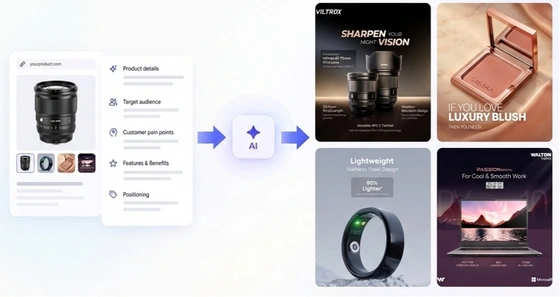
AI understands your product before creating the ads
Add your product. Pick Ads extracts details, benefits, audience, positioning, and visual assets - then turns that into structured creative direction.
Understands what the product actually is and who it is for
Uses your real product imagery, not invented objects
Turns product details into benefit and message angles
Creative Inspiration
Start with an idea, not a blank canvas.
From product to ads you can test
01
Understand your product
Add your product - storefront, SaaS site, AI product page, App Store, or any website. Or add images and details. Pick Ads reads photos, benefits, and positioning you already own.
02
Find the ad ideas worth testing
AI applies creative angles to surface different creative angles - hooks, messages, and visual directions tailored to your product.
03
Produce creatives ready to test
Generate image ads, short-form video, or motion. Export JPG, PNG, or MP4 in the ratio you need - then come back for the next batch.
Formats
One product. Image and short video ads
Start with your product, not a blank prompt. Produce static image ads and short-form video ads from the same URL, then iterate on the angles that earn attention.
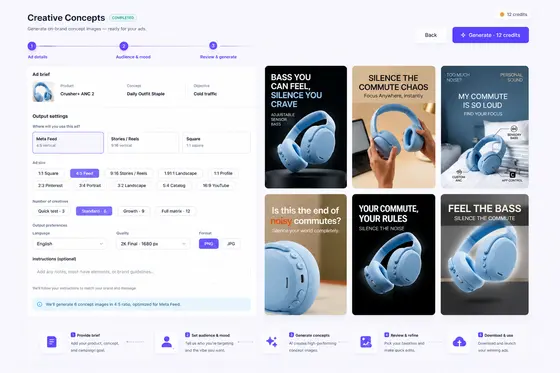
Image ad variations
Distinct stills and Image Concepts - angles worth testing, then ads you can launch.
Short video ads
Short-form product videos and motion creatives for paid social - no filming required.
Image ad · 1:1
Video ad · 9:16
Creative variations
Find creative angles worth testing
Explore different hooks, visual styles and messaging for the same product, then keep iterating on the variations that earn attention.
Hook variations: explore benefit angles, direct offers, or objection handling headlines.
Visual styles: switch layouts, background colors, and typography instantly.
Ad copy batches: generate different messaging angles in 15 languages in one run.
Benefit hook
Lead with what the product does for the buyer.
Pain hook
Name the problem, then the fix.
Offer hook
Lead with the deal - then the proof.
Four paths to more distinct ad variations
Built for where your ads actually run
Every format your media buyer already needs - no manual resizing. One product, every placement - generate once, export everywhere your campaign runs.
Aspect ratios & platforms
Meta feed · instagram feed
Meta feed · instagram feed · marketplace
Stories · reels · TikTok
Display · youtube · ctv
15 Ad copy languages
AI rewrites headlines and body copy in your target language when you generate ads - not machine translation of source copy.
Your content. Your data. Your control
Own what you create. We build on public data, not other brands' creatives.
Your content, your rights
Full commercial rights to use, publish, and monetize every image and video you generate - no attribution required, no extra license needed.
Your products, your inputs
We use the product information and assets you provide to create your ads. Built from your product, owned by you - we don't use other brands' assets as inputs to generate your creatives.
Built on public ad data
Pick Ads uses publicly available advertising information to identify creative patterns and market trends - not to redistribute, reuse, or clone third-party ad creatives.
Add your product - start free
Add a product by pasting a URL or entering it manually. AI understands it, develops creative angles, and generates image and short video ads.
One product → more distinct ad variations
Image + short video from the same product
8 free credits · no credit card
What's included
15
Ad copy languages
14
Export ratios
8
Free credits to start
Questions? Answered
Can't find it? Contact us - We reply within one Business day.
How does Pick Ads generate ads?
Add your product (paste a URL or enter it manually). Pick Ads understands the product, develops different creative angles, and turns them into image or short video creatives you can try. You do not need to connect an ad account.
What does Pick Ads generate from?
Your product - not a blank prompt. Pick Ads uses the images, details, and benefits you already have, then develops different creative ideas you can produce as a single ad or a batch of concepts.
What are the four CREATE modes?
URL to Image Ads turns a product into image ad variations. Image Concepts explores creative ideas first, then turns them into image ads. URL to Video Ads creates short product-focused video ads. Video Concepts explores video ideas first, then creates a short video ad.
Do I need design experience?
No. The platform handles layout, visual hierarchy, and style. You bring your product, brand, and message. Everything else is AI-assisted.
What formats can I export?
Image ads export as JPG or PNG in standard social sizes (1:1, 4:5, 16:9, 9:16 and others). URL to Video Ads and Video Concepts export MP4. Download, export, and share are included on every plan.
What is a Workspace?
A workspace represents one brand. Each workspace has its own Brand Kit, products, and creatives - kept separate from your other brands.
What is included in a Brand Kit?
Your logo and brand colors, applied automatically to the ads you generate in that workspace.
Can I manage multiple brands?
Yes. Use a separate workspace for each brand, each with its own Brand Kit, products, and creatives. Each plan includes a set number of workspaces - see Pricing for details.
How do credits work?
Credits are used when you generate or edit creatives - images cost less than video. Paid plan credits reset every billing cycle; Free credits are one-time and don't expire. Full breakdown on Pricing.
What's included in the Free plan?
8 one-time credits (about 4 image ads). URL to Image Ads and Image Concepts included. 1 workspace. URL to Video Ads, Video Concepts, and Brand Kit are available on paid plans. No credit card required.
100% Test-Ready Guarantee
From your product to test-ready creative - without starting from a blank canvas.
Pick Ads turns your product into a creative you can refine, export, and put into testing.
Generate a strong first draft from your product
Refine the copy, visuals, and style up to 3 times
Export when it's ready to test
Our guarantee
If you complete the workflow and still can't get to a usable creative, we'll restore 100% of the credits used for that creative.
Just contact us within 7 days of your last refinement.
The guarantee applies to static image ads only.
Built for teams that need to get from product to creative to test, without getting stuck on a blank canvas or endless revision cycles.