Is Amazon Reviews Exporter free to use?
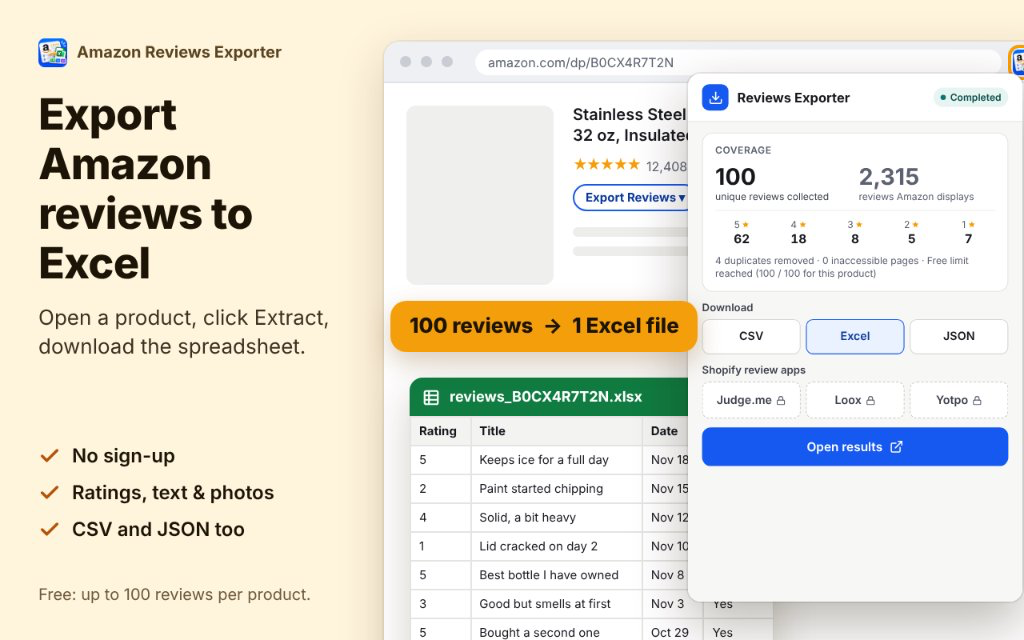
Yes. You can extract up to 100 unique reviews per ASIN for free into Excel, CSV, or JSON without creating an account. Premium unlocks Max Mode, Bulk ASINs, and Shopify imports.

Updated November 2026
Amazon Reviews Exporter extracts Amazon product reviews in your browser and downloads Excel, CSV or JSON. Free: 100 reviews per ASIN with no sign-in required.
Premium adds Max Mode, Bulk ASIN queues, AI-ready Markdown, and Shopify-ready Judge.me and Loox import CSVs with automatic product handle mapping.
Private by design: all review processing runs locally in your browser. Review text and reviewer names never leave your device.
Free: up to 100 unique reviews per ASIN. Premium: $9.99 / month or $99.90 / year.
 1 / 5
Amazon Reviews Exporter is a lightweight Chrome extension that helps sellers, marketers, and researchers export customer feedback directly from Amazon product pages into organized spreadsheets. It supports one-click extraction with an on-page button or side panel dock, providing Excel (.xlsx), CSV, and JSON downloads.
Whether you are migrating customer proof to Shopify apps like Judge.me and Loox, conducting competitor review analysis, or preparing training data for LLMs, Amazon Reviews Exporter extracts clean, structured review records without manual copying.
Unlike cloud scrapers that require API keys or server proxies, Amazon Reviews Exporter runs in your local browser session. Data stays on your computer and is private by design.
Click Export Reviews on any Amazon product or review page to extract reviews into a clean, formatted Excel spreadsheet, CSV, or JSON file.
Start extracting immediately with no account creation. Free users can collect up to 100 unique reviews per product across all major Amazon marketplaces.
Export reviews formatted specifically for Judge.me and Loox. Map product handles and keep reviews compliant with import standards.
Premium Max Mode automatically cycles through star ratings (1★ to 5★) and sort orders (Recent, Helpful) to collect deeper review coverage while pacing requests to avoid throttling.
Paste a list of ASINs or product URLs to run batch extractions. Pause, resume, retry failed items, and download combined or separate spreadsheets.
Track collected reviews per star rating against what Amazon displays, giving you full visibility into extraction coverage.
Export reviews as clean Markdown formatted for ChatGPT, Claude, and Gemini with sample prompt templates for sentiment and complaint analysis.
Review text, customer names, ratings, and photos are processed in your browser. No review content is uploaded to our servers.
$0
For e-commerce sellers, agencies, and researchers who need bulk data.
$9.99 / month or $99.90 / year
Migrate authorized Amazon customer reviews to your Shopify store using pre-formatted CSV imports for Judge.me, Loox, and review apps.
Extract reviews from top competitors to identify product defects, customer complaints, and missing features before manufacturing.
Gather thousands of real user opinions across product categories to guide roadmap decisions and customer sentiment tracking.
Feed structured Markdown review summaries into ChatGPT or Claude to extract common pain points, feature requests, and tone of voice.
Free extraction supports up to 100 unique reviews per product without signing in. Premium unlocks Max Mode and Bulk ASINs extraction.
Yes. You can extract up to 100 unique reviews per ASIN for free into Excel, CSV, or JSON without creating an account. Premium unlocks Max Mode, Bulk ASINs, and Shopify imports.
Yes. With Premium, you can generate ready-to-import CSV files specifically formatted for Judge.me and Loox, including product handle mapping.
Amazon caps review pagination based on region, product, and session. Max Mode cycles multiple star filters and sort orders to retrieve the maximum accessible set, and displays a coverage ledger.
No. Review extraction and file generation happen entirely in your local browser. Review text, reviewer names, and product details never leave your device.
Yes. Amazon Reviews Exporter works across major Amazon marketplaces including US, UK, DE, FR, IT, ES, CA, JP, and more.
You can paste a list of ASINs or Amazon URLs into the Bulk tab. The extension queues each product, collects reviews in background tabs, and allows you to download combined or separate workbooks.
No. Amazon Reviews Exporter is an independent Chrome extension developed by Pick Ads and is not affiliated with or endorsed by Amazon, Judge.me, or Loox.
Start with the manual steps. The extension is the faster path when the list is long.
Understand Yotpo review import eligibility, structure an Amazon review CSV, map product identifiers, and validate
Create a Loox-oriented Amazon review export with correct product mapping, supported photo links, and a careful CSV
Prepare authorized Amazon review data for Judge.me with product handles, CSV validation, provenance checks, and an
Collect Amazon review datasets for multiple ASINs, track progress, avoid duplicates, and export one combined file
Download Amazon reviews as a clean CSV file, choose the right columns, check duplicates, and reuse the data for research
Learn how to export Amazon reviews to Excel, choose useful review fields, and understand what Amazon makes available
Practical setups by niche. Browse the full list or jump into a vertical.
Prepare Amazon review data for ChatGPT using structured exports, careful privacy choices, and prompts that separate
Use Amazon negative review analysis to prioritize common product complaints, track evidence, and create a focused
Plan a Shopify Amazon review migration for eligible reviews with product mapping, destination-specific CSV files,
Use Amazon competitor review analysis to identify recurring complaints, compare ratings across products, and organize
How Amazon Reviews Exporter stacks up against alternatives and build-vs-buy options.
Compare Pick Ads Amazon Reviews Exporter with Amazon Reviews Extractor & AI Summary to choose between Shopify files
Compare Pick Ads Amazon Reviews Exporter vs ExtStore on batch ASINs, spreadsheets, local data, and Shopify import
All review extraction, parsing, and spreadsheet generation run locally in your browser. We never upload customer review text, reviewer identities, or your browsing history to our servers. Google sign-in is only used to manage Premium subscription entitlement.
Open an Amazon listing, click Extract, and download a clean spreadsheet. Free 100 reviews per ASIN with no sign-up required.
Guides · Use cases · All Extensions · Contact · Terms
Explore other Pick Ads extensions, or browse the full extensions directory.
Discover how marketing teams and brands turn product URLs into high-converting ads with Pick Ads commercial use cases.