
Shopify geolocation redirects that put shoppers first
Recommend the right currency, Shopify market, or regional store based on where shoppers visit from. Let them choose before switching - with automatic redirects and country blocking when you need more control.
Free plan available · Works with Shopify Markets · No code required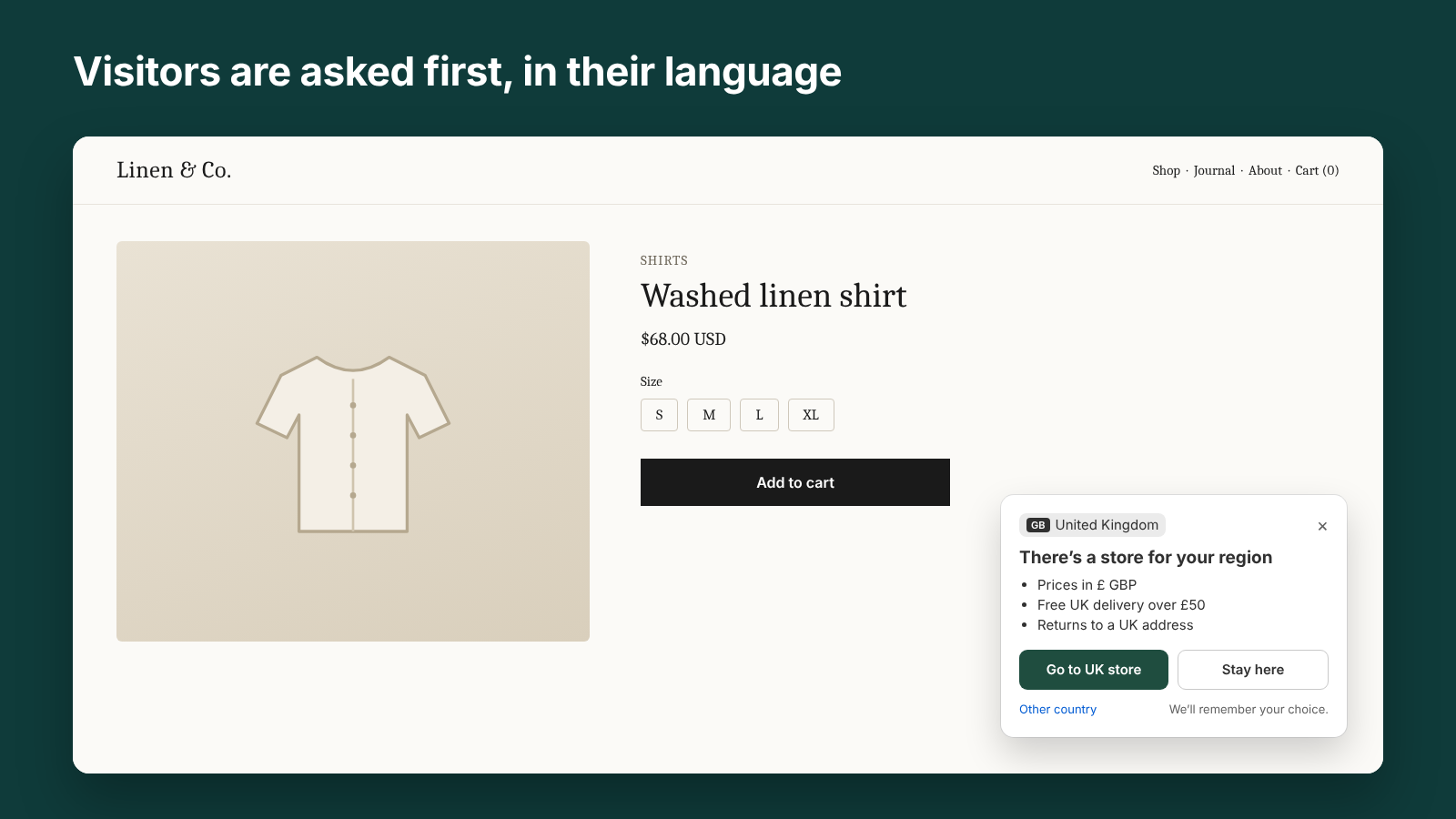
Your shoppers are global. Their experience should make sense locally.
Someone in Canada lands on US dollar prices. A UK visitor opens your US store instead of your UK store. Another shopper browses products you cannot ship to their country.
Wrong currency shown
Shoppers from Canada or the UK land on US dollar prices. When international customers see the wrong currency, bounce rates rise before they even see your products.
Wrong storefront visited
You maintain regional stores (e.g. US, UK, EU) for distinct inventory, taxes, and shipping. International visitors land on the wrong regional domain via organic search or social links.
Unsupported shipping destinations
Visitors spend time building a cart only to discover at checkout that you do not ship to their country or region, creating frustrating customer support tickets.
Go live in three simple steps
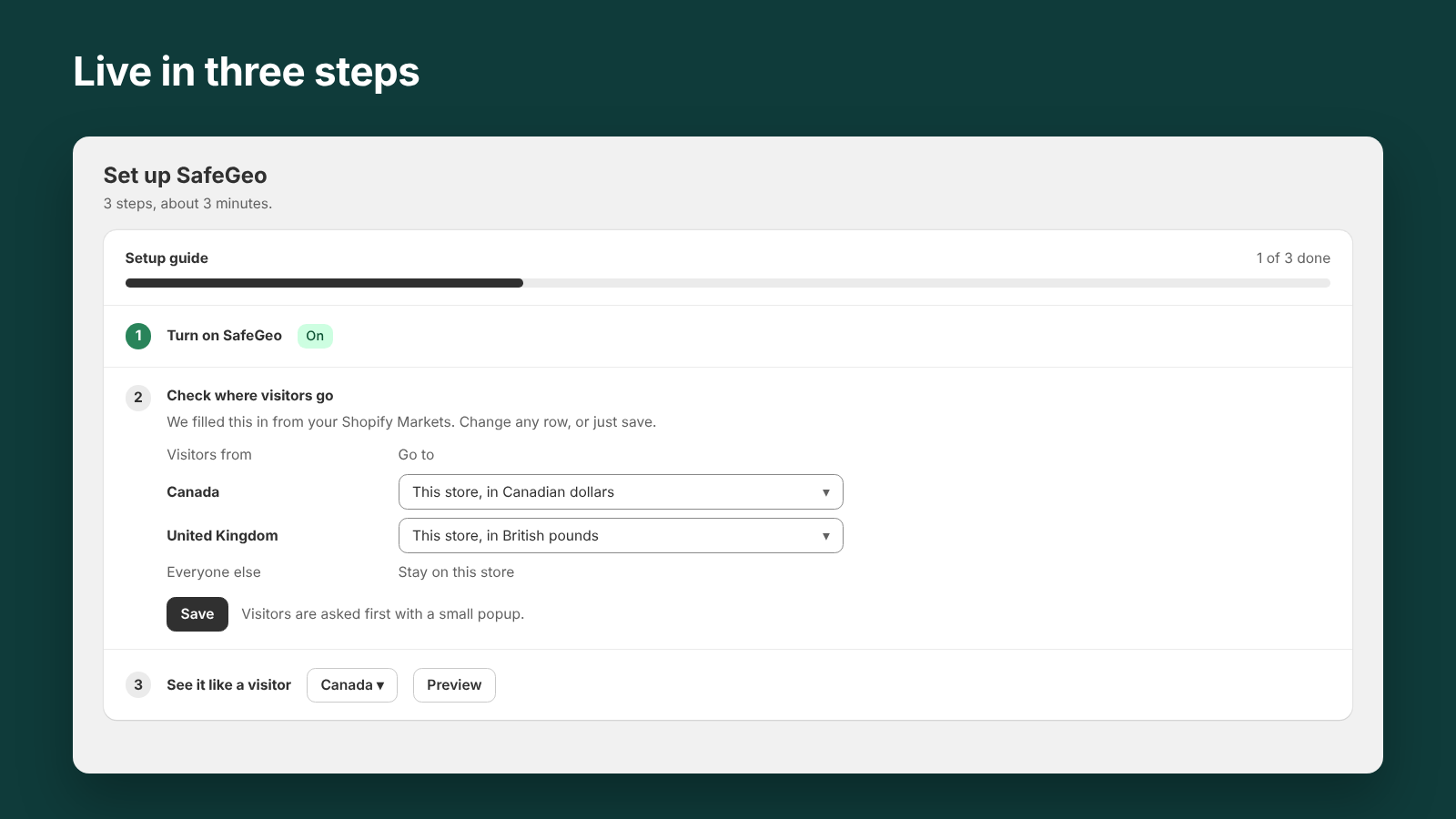
SafeGeo syncs directly with your Shopify configuration so you can start guiding traffic within minutes.
Enable SafeGeo app embed
Install SafeGeo and enable the app embed in your Shopify theme editor with a single toggle. SafeGeo runs seamlessly within your theme without modifying core template files.
Review your destinations
SafeGeo automatically syncs your configured Shopify Markets. Set preferences for each region: ask shoppers first via a recommendation popup or redirect automatically.
Preview the shopper experience
Use the built-in country simulation tool to test how popups and redirects behave for visitors around the globe - directly from your admin without needing a VPN.
One app. Three ways to guide traffic.
Choose the routing behavior that respects your brand, preserves conversions, and protects marketing campaign ROI.
Recommend the right market and currency
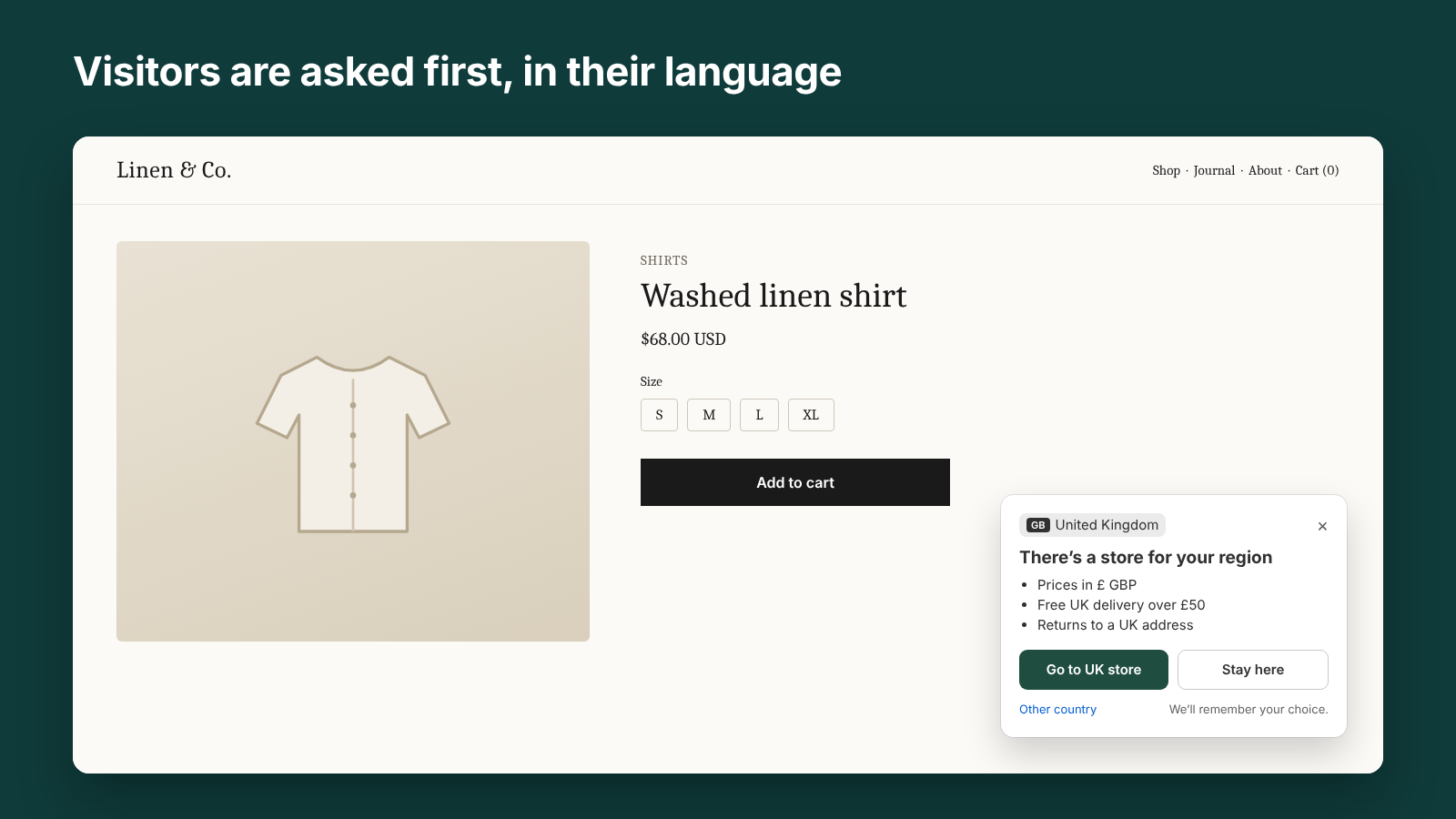
Help international visitors switch to the Shopify Market configured for their region. Show a clear, branded recommendation popup before any switch occurs. If a shopper prefers their current view, they can dismiss the banner and keep browsing.
Automatically syncs your Shopify Markets settings
Shows a shopper-friendly currency and language recommendation banner
Remembers shopper decisions so they are not prompted on every page load
Suppresses popups when the shopper is already in their ideal market
Route visitors to regional stores or websites
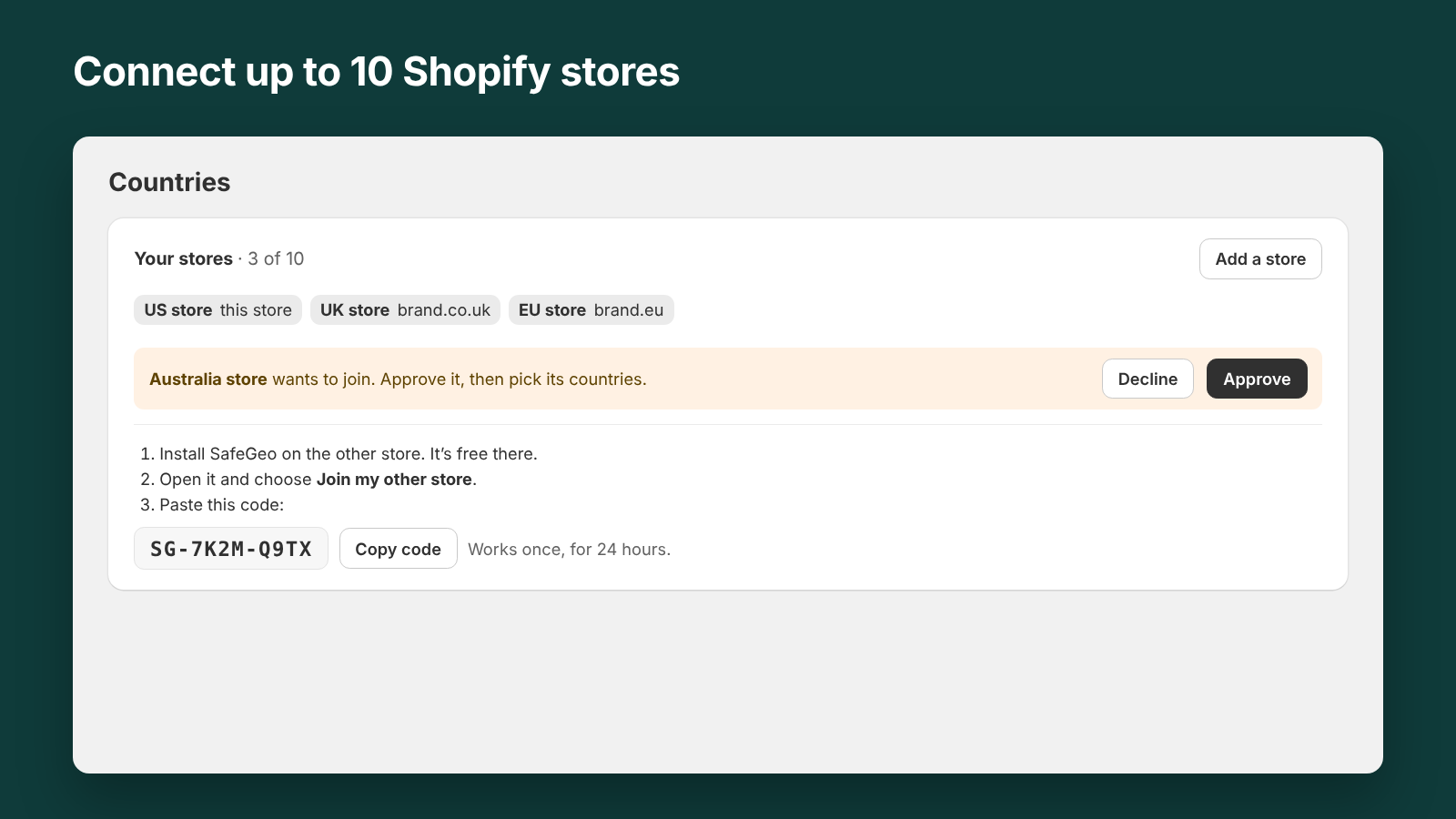
Managing separate Shopify stores for North America, the UK, Europe, or Australia? SafeGeo routes visitors to the dedicated regional storefront intended for their country. Choose between an ask-first recommendation or an automatic instant redirect.
Country-specific routing rules with URL path preservation
Supports external website routing on Starter and above
Multi-store routing across up to 4 or 10 connected Shopify stores
Preserves marketing campaign parameters (UTMs, gclid, fbclid)
Restrict traffic from selected countries or IPs
If you do not ship or sell to specific countries or want to prevent unwanted traffic from high-risk IP addresses, display a clean, branded notice explaining that storefront access is restricted, complete with a reference code for customer support inquiries.
Country-level access control on Starter, Multi-store, and Scale
IP-specific blocking rules for targeted storefront protection
Branded restriction screen matching your store logo and typography
Unique reference codes on block screens to expedite support resolution
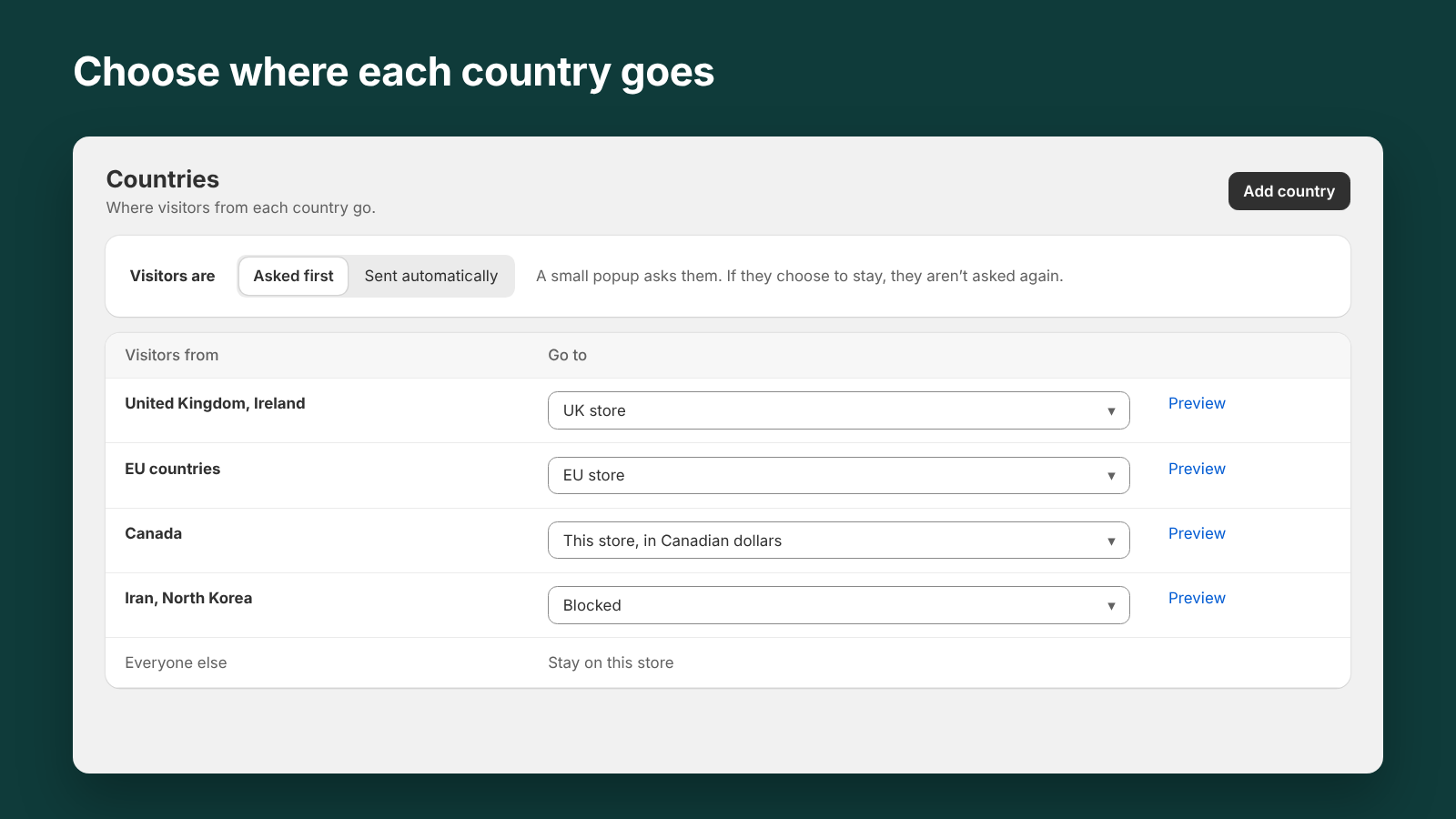
A recommendation that feels like part of your store
Choose a compact popup, bottom bar, or centered message. Customize copy and styling so the choice is crystal clear on desktop and mobile.
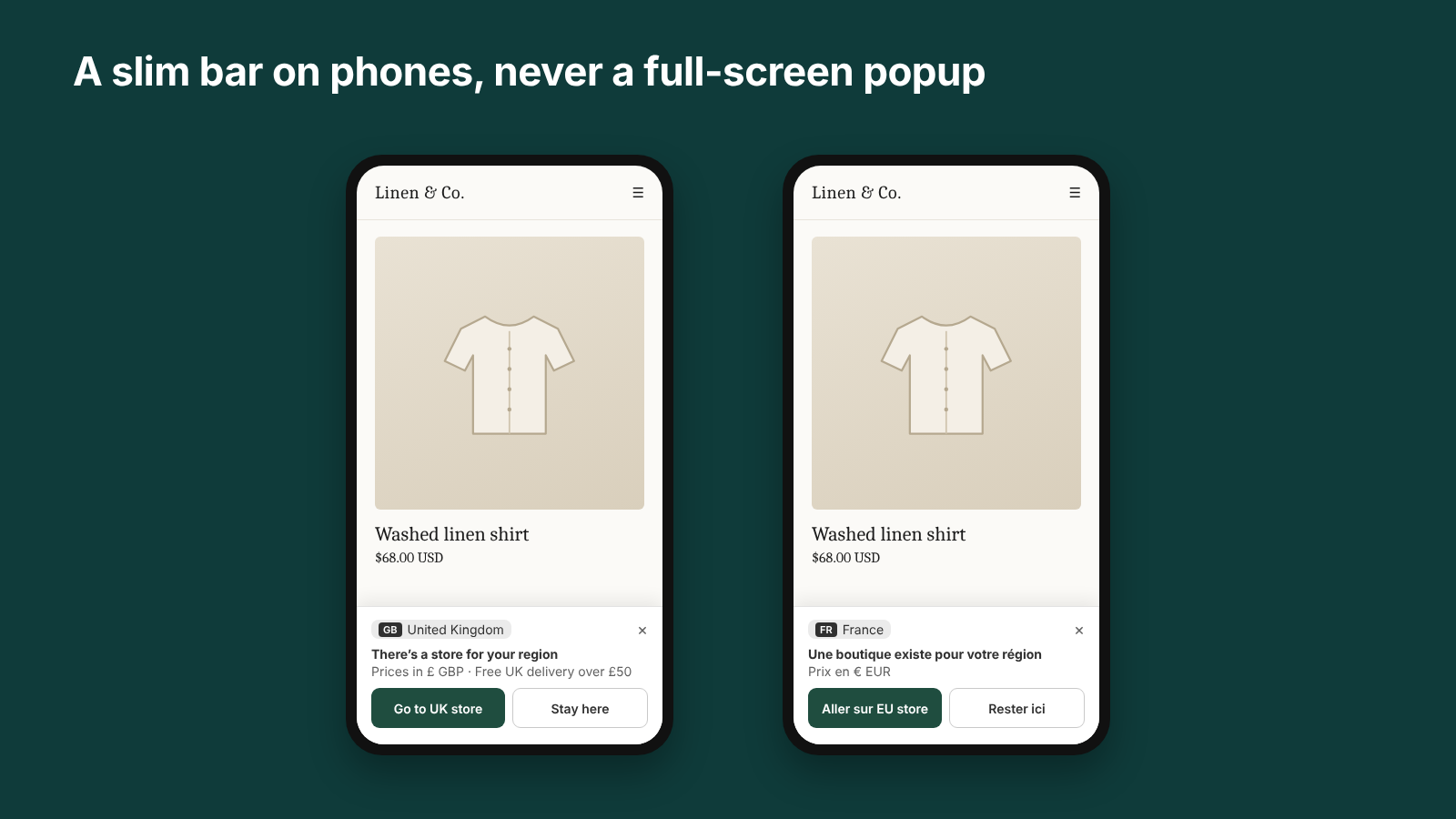
Theme-aware styling
SafeGeo integrates smoothly into your Shopify theme typography, radius, and color palette so popups feel like native components of your store.
Multiple popup formats
Choose the layout that best fits your design: a compact top or bottom floating bar, a subtle corner card, or a centered modal.
10+ built-in languages
Built-in translations for top ecommerce languages (English, French, German, Spanish, Italian, Portuguese, Japanese, and more) matching the visitor’s browser.
Zero layout shift
Engineered for fast execution without blocking initial page rendering or causing cumulative layout shifts (CLS) on mobile devices.
Thoughtful redirects, fewer unwanted surprises
SafeGeo is built around safety guardrails to protect your SEO rankings, marketing attribution, and checkout integrity.
Ask before switching
Give shoppers a choice. Forcing immediate redirects can disorient shoppers who arrived from a specific ad campaign or share link.
Respect search crawlers
SafeGeo recognizes Googlebot and legitimate search engine crawlers, leaving them unredirected to protect your search indexation and SEO hierarchy.
Leaves checkout intact
SafeGeo operates as a storefront theme embed and does not interfere with native Shopify checkout security or payment gateways.
Graceful unknown location fallback
When visitor IP geolocation is ambiguous or masked, SafeGeo remains neutral and defaults to the current storefront rather than guessing.
Respects shopper choice
When a visitor chooses "Stay on this store", SafeGeo stores their preference locally and will not bounce or nag them again.
Know what shoppers see - and what SafeGeo does
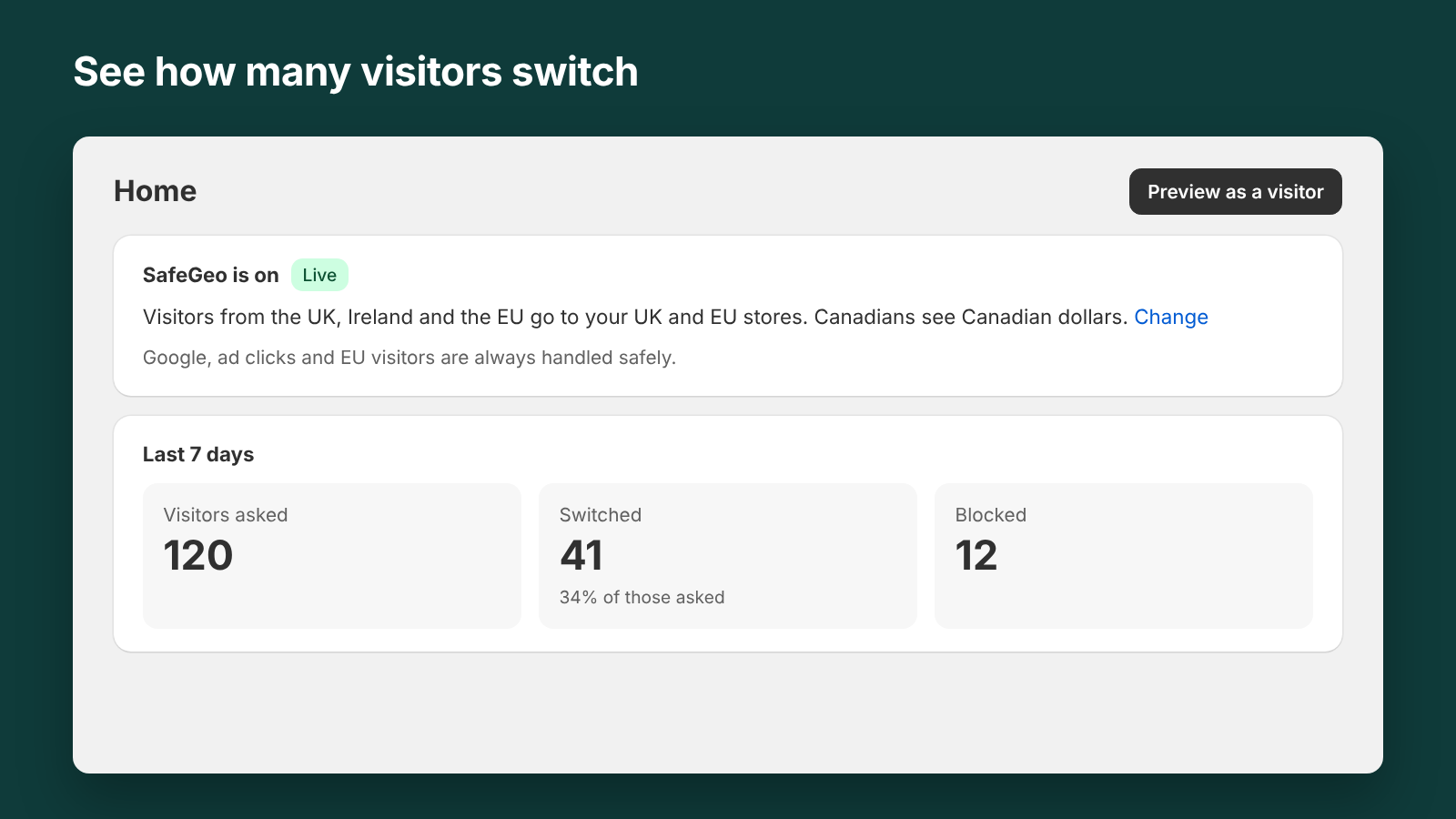
Preview country-specific experiences before going live. Review redirect, recommendation, and block activity in your dashboard.
Country simulation tool
Test your popup, redirect rules, and fallback behavior for any country in the world without having to toggle VPNs or ask overseas colleagues.
Activity visibility
Review how many visitors were offered recommendations, redirected, or shown block notices per region to evaluate international traffic trends.
Setup verification checks
Automated onboarding checks confirm your app embed is active and your Shopify Markets configuration is properly linked before you go live.
Looking for an alternative to Shopify’s Geolocation app?
Shopify’s legacy Geolocation app stopped accepting new installations on February 1, 2025, and reached end-of-life on March 24, 2025. While Shopify provides basic native redirection, international merchants often require more flexibility.
Shopify Geolocation app is discontinued and unsupported.
Native Shopify redirects switch automatically without offering shoppers a choice first.
SafeGeo allows merchants to offer an ask-first popup, avoiding disorienting forced redirects.
SafeGeo includes country/IP blocking and multi-store routing in a single lightweight app.
SafeGeo provides visual country simulation directly in Shopify Admin.
Start free. Upgrade when you need more control.
No per-visitor pricing. Automatic redirects have generous monthly limits; visitor-choice recommendations remain unlimited on all plans.
Monthly billing
Annual billing
Free
Perfect for small stores starting out with Shopify Markets.$0
/ month
Starter
For growing merchants needing higher limits and country rules.$7.99
/ month
Multi-store
For brands operating separate regional Shopify storefronts.$23.20
/ month
Scale
For enterprise brands managing large global store portfolios.$47.20
/ month
Frequently Asked Questions
Everything you need to know about SafeGeo, Shopify Markets, and country routing.
What does SafeGeo do?
SafeGeo helps Shopify merchants recommend the right regional market and currency, route visitors by country to another regional store or external website, and restrict storefront access from selected countries or IP addresses.
Does Shopify already support automatic country redirects?
Yes. Shopify provides native country and language redirection for configured markets. However, Shopify redirects visitors automatically without giving them a choice. SafeGeo adds an ask-first popup, external website routing, country and IP blocking, and multi-store management in one app.
Why should I offer a recommendation popup instead of an automatic redirect?
Automatic redirects can disorient shoppers who clicked an ad for a specific country, followed a shared social link, or travel abroad. An ask-first popup lets shoppers confirm before switching markets, protecting paid advertising conversion rates.
Will SafeGeo change my checkout currency?
SafeGeo does not set exchange rates or payment currencies. Shopify Markets and your payment gateway (such as Shopify Payments or Adyen) determine which currencies customers see and pay with at checkout.
Do I need Shopify Markets to use SafeGeo?
You need Shopify Markets if you want to use market and currency recommendation popups. However, routing visitors to a separate Shopify store or external website can be configured independently on the Starter plan and above.
Can I route visitors to another Shopify store automatically?
Yes. On the Multi-store and Scale plans, you can configure automatic redirects or ask-first recommendations to other connected Shopify stores. Note that shopping carts are not transferred across distinct Shopify stores.
Will SafeGeo affect my store’s SEO or search rankings?
SafeGeo is specifically designed to recognize legitimate search engine bots (like Googlebot) and avoid redirecting them, ensuring your localized URLs and regional pages remain discoverable and indexed.
What happens when I reach my automatic redirect quota?
SafeGeo never breaks your store or incurs unexpected overage fees. When your monthly automatic redirect quota is reached, SafeGeo automatically falls back to visitor-choice recommendations until the monthly cycle resets.
How does the country preview tool work?
Inside the SafeGeo Shopify admin, you can select any country from a dropdown to simulate what a visitor from that country experiences on your store. You can test your rules and popups safely without using a VPN.
Can country blocking stop fraud or malicious bots?
No. SafeGeo browser-side blocking is a storefront access control tool intended to prevent regular shoppers from unsupported regions from browsing. It is not an infrastructure firewall or fraud guarantee.
Does SafeGeo work with headless Shopify stores?
SafeGeo is designed for Shopify Online Store themes utilizing theme app embeds. Headless architectures (Hydrogen, Next.js storefronts) are not currently supported.
Is there a free trial for paid plans?
Yes. Starter, Multi-store, and Scale plans include a 7-day free trial. You can test all features and switch back to the Free plan at any time before the trial ends without being charged.
Make international shopping feel more local.
Give international shoppers a clear way to reach the right regional market or store - with rules you can review and control.
Install free on ShopifyFree plan available · No code required · 7-day free trial on paid plans